Test BlueChart 6.5 on GpsMap 76S and GpsMap 60CS
In BlueChart the depths shows soundings or depth on obstructions. Soundings
are displayed correct for 76S and 60CS, depth of obstructions are not.
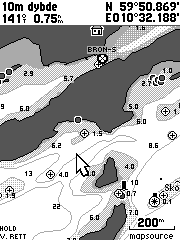
In the 200m zoom images we can look at the 4.0 m obstruction near the
cursor. On 76S the depth is written centred 4 pixels to the right of the
obstruction. On 60CS the depth is written 4 pixels to the right of the
obstruction and it is moved 10 pixels up. This placing is confusing since
it’s not easy to see if this is an obstruction or a sounding.
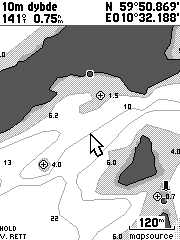
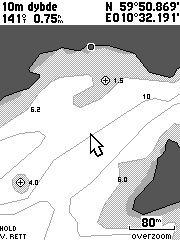
The situation is even worse on zoom 120m and 80m were the depth of obstruction
does not show up at all on the 60CS.
These images also show how the 60C use a lot of space for the header.
The 60CS header is 56 pixels high (23% of the screen), while the 76S header
only uses 25 pixels (10.5% of the screen).
|
Garmin support:
Otto Sep. 6 2004:
With BlueChart Atlantic ver 6.5 I have seen that the depths of obstructions
are not displayed correct. With zoom=200m the depth of the obstructions is written
10 pixels too high and for zoom=120m and less the depth of obstructions does
not show up at all. I have compared the same charts on GpsMap 76S and GpsMap
60C and you can see the result on http://www.milvang.no/gps/bluechart/bc60cs76s.html
Garmin Sep.7 2004
Good morning
I have looked at the example you give on your website, I do accept that the
pixel size on the new GPSMAP60 does appear to limit the depth information. At
present there are no plans to alter this, if you are ever unsure though, obviously
by placing the cursor on the position will confirm what the correct depth is.
Otto Sep. 7 2004:
Hello!
I think you misunderstood the problem, it has nothing to do with the pixel size
(or the font size).
Problem 1 with zoom=200m: The depth of the obstruction is written far away from
the obstruction. Why isn't it written near the obstruction as it is for 76S.
Problem 2 with zoom=120m/80m/...: The depth of the obstruction is not written
at all. When you zoom in, it's becase you would like to have more information,
now you get less information. I know you can use the cursor, but that is very
unconvinient.
Garmin Sep.7 2004
Otto
I understand what you are saying the problem is, what I am saying is that there
is no solution to this, unless it is modified in future updates. Whilst selecting
with a cursor is inconvenient, it is an acceptable way of getting this information.
Otto Sep. 7 2004:
Hello
As far as I know the same software is running on 76CS, and Garmin are marketing
76CS as a marine unit. If depth of obstructions are not visible on a marine
unit it's a major flaw. I know it's nothing to do with it in the current firmware,
however it's important to give this flaw high priority so it's fixed in the
next software release.